Timelines that work the way you do
Timetoast Unbound is a powerful timeline maker designed to help you create timelines your way.
With features like custom fields, color-coding, flexible views, sorting/filtering, and quick-start templates, this timeline tool lets you organize and visualize your projects with clarity and precision.
Whether you're planning business roadmaps, student projects, or personal milestones, Unbound turns events into clear, engaging timelines you can share with anyone.
Timetoast Unbound is now in early access on all plans.

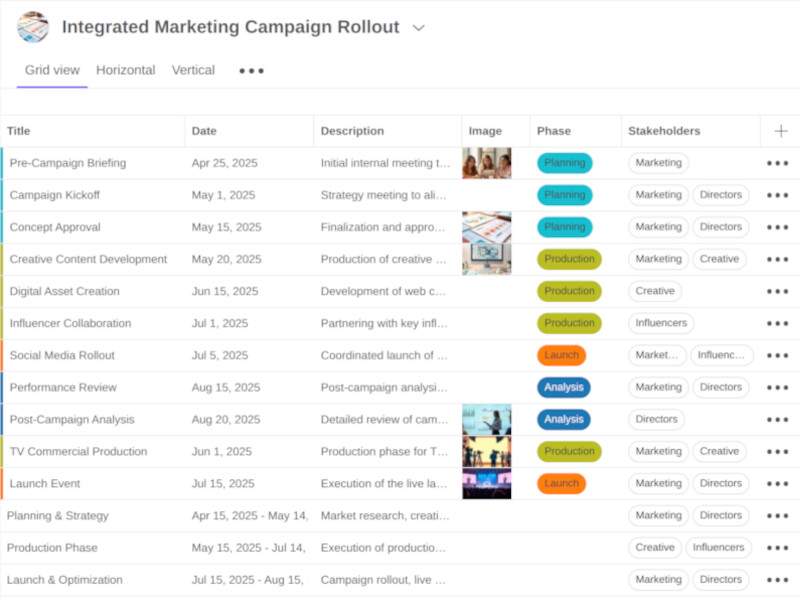
A modern timeline maker for your projects
Timetoast Unbound combines the clarity of a timeline with the power of a database. It’s designed for projects that need more than just dates and titles.
Start by entering your data in the Grid View—a spreadsheet-like editor that makes adding, editing, and sorting events incredibly fast. Then, switch instantly to a timeline view to see the big picture.

Define your data with Custom Fields
Every project is unique. Unbound lets you define exactly what information you need to track with Custom Fields.
- Single-select: Assign a clear status (e.g., "In Progress", "Done") or phase to each event.
- Multi-select: Tag items with multiple categories, teams, or topics (e.g., "Marketing" + "Q1").
- Rich Text & Images: Add detailed notes, descriptions, and visual assets to every item.
- Numbers & Text: Track budgets, IDs, or any other data point.

Visualize your way
Different tasks require different perspectives. Unbound lets you switch views instantly without losing context.
- Horizontal Timeline: The classic view for visualizing duration, overlaps, and the flow of time. Perfect for roadmaps and history.
- Vertical Timeline: A scrollable, mobile-friendly list of events. Great for detailed chronologies and storytelling.
- Grid View: Focus on the data. Sort, filter, and bulk-edit your items efficiently.

Bring clarity with Color-coding and Filters
Turn your data into visual insights. Unbound helps you cut through the noise and focus on what’s important.
- Color-coding: Automatically color your timeline events based on their status, phase, or team. Spot patterns and bottlenecks at a glance.
- Advanced Filtering: Filter your view by any field—show only "High Priority" tasks or events assigned to "Team A".
- Sorting: Organize your grid and timeline by date, status, or any other custom field.
Private by default, ready to share
Unbound projects are designed for privacy. Your work stays private until you choose to share it.
Invite team members to collaborate privately, or generate a public link to share your timeline with the world. You have full control over who sees your data.
Guides and Resources
Get the most out of Timetoast Unbound with these guides and articles.
Learn how to use advanced features like custom fields, filters, and color-coding to build better timelines.
-
Timetoast Unbound now available on the free plan
Timetoast Unbound is now available to all users, even those on our free plans. Now everyone can create flexible timelines with custom fields, color coding, and more.
-
Using single-select fields to track status
Learn how to use the flexible new single-select field to track phase, status, or any other attribute in your timelines, then color-code events for clarity.
-
Focus on sub-sets of timeline events with filters
Discover how to use filters in Timetoast Unbound to quickly narrow down your timeline view to the events that matter most.
-
Color-coded timeline events and multi-select fields
See how multi-select fields and color coding can help you organize complex projects and visualize key information in your timelines.
-
Timeline Templates
We've added timeline templates to help you get started quickly. You can now choose from a variety of pre-built templates for different use cases.
Timetoast: Everything You Need to Know
Who can access the new Timetoast features?
Timetoast Unbound is in early access (beta) for all users.
What’s new in Timetoast compared to the classic version?
Timetoast Unbound adds custom fields, a spreadsheet-like grid editor, instant switching between grid and timeline, color coding, filters, sorting, and CSV import.
Will my existing timelines still work if I start using Timetoast Unbound?
Yes. Your Classic timelines remain unchanged. Timetoast Unbound is available for new projects, and you can use both side by side.
Can Timetoast handle product roadmaps and project plans?
Yes. Timetoast Unbound lets you track milestones, phases, owners, and status with custom fields, then switch views for planning and updates.
Is Timetoast suitable for legal case chronologies?
Yes. Timetoast Unbound supports event dates, participants, sources as custom fields, color by matter or phase, and quick review in grid or timeline.
Is Timetoast good for educators, students, historians, and biographers?
Yes. Timetoast Unbound helps map periods, sources, and citations with custom fields; vertical timeline suits mobile, and grid speeds data entry.
Can Timetoast plan marketing campaigns and content calendars?
Yes. Timetoast Unbound uses categories, status, owners, and deadlines as custom fields, with filters and color coding for focus.
Can I import data into Timetoast from Excel or Google Sheets?
Yes. Export to CSV, then import into Timetoast Unbound and map columns to your custom fields.
How do custom fields work in Timetoast?
In Timetoast Unbound you can add fields like status, owner, budget, tags, or source, choose field types, and sort, filter, and color by field.
Does Timetoast support sharing and privacy controls?
Timetoast Unbound supports private and public sharing. Keep views private and choose to share privately to invitees or share a public link.
Do I need to upgrade Timetoast to use the new features?
No, you won't need to upgrade. Timetoast Unbound is available on all plans for new projects, although usage limits and features vary per plan.
Is there a money-back guarantee on Timetoast plans?
Yes. All plans include a 30-day money-back guarantee, and it applies to Timetoast Unbound.